
For coaches · updated November 2026
The Wellonis coach handbook
Everything you need to start coaching on Wellonis: from creating your account to sending your first plan and getting paid. Screenshots use an example coach, Sam Taylor, and an example client, Jordan Lee.
Quick start: live in 10 steps
- 1.Create a coach account at wellonis.com/signup/partner (email, password, 18+).
- 2.Choose your @username, name, date of birth and country.
- 3.Fill in your Coaching profile: coach type, headline, languages, bio.
- 4.Add at least one package with a clear price.
- 5.Upload your ID, plus your qualification, first aid/CPR and insurance for badges.
- 6.Choose how you get paid: Stripe to your Australian bank, or bank transfer if you live elsewhere.
- 7.Turn on video calls and set your weekly availability (optional).
- 8.Turn on phone notifications so you never miss a request.
- 9.Wait for our team's review (usually within 2 business days). You go live.
- 10.Share your link wellonis.com/@yourname and your QR code with your own clients.
Welcome to Wellonis
Wellonis is a marketplace where members find a coach and train with them online or in person. You bring the coaching; we bring the members, the payments, plans, chat, video calls and a safe place to work. Joining is free and there's no monthly fee.
- Who can join: personal trainers, strength and conditioning coaches, sport-specific, physique, running, yoga and Pilates, mobility, nutrition, wellness and lifestyle, and fitness coaches.
- You set your own packages, prices and availability.
- Wellonis keeps a 20% platform fee only when a client pays you, and just 10% on clients you bring in yourself through your link. Members pay a small service fee on top of your price that covers card payment costs, so your share is always your price minus the platform fee. The small fee for sending your payout (Stripe or bank transfer) comes off the payout.
- Founding coaches our team invites (during launch or special events) pay a 10% platform fee instead of 20% for a set period, and keep a permanent Founding coach badge.
- Members pay Wellonis; we hold the payment until your client accepts your work, then pay you every Wednesday.
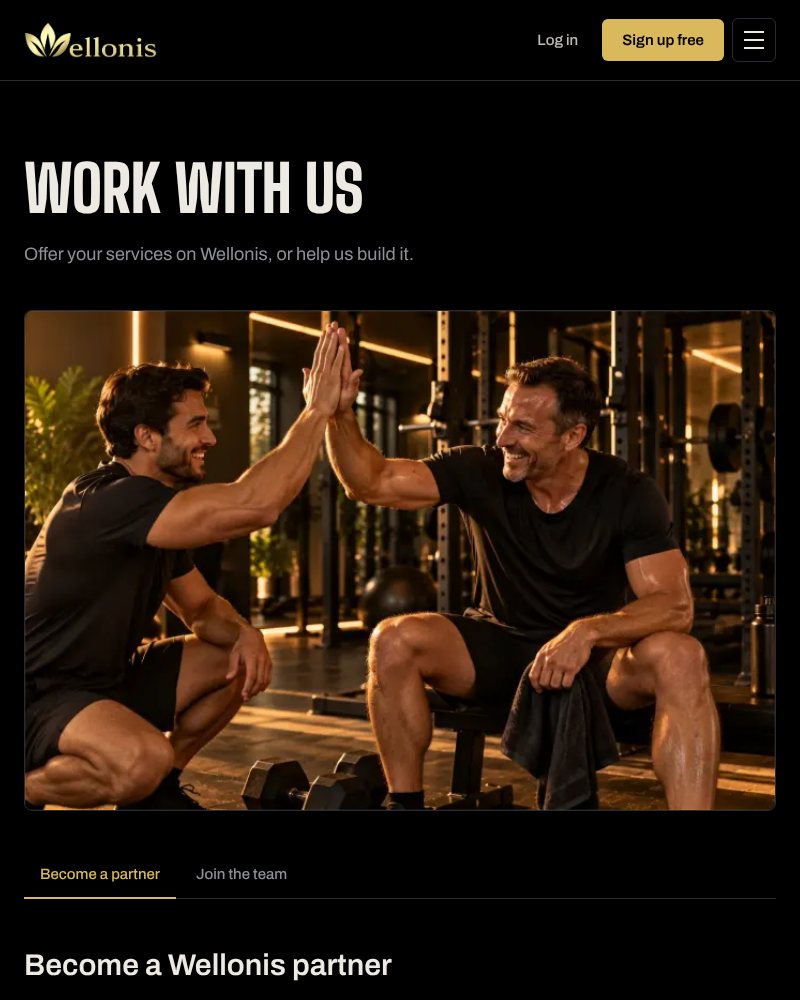
1. Create your coach account
It takes about a minute. Use an email you check often: that's where requests and payment updates arrive.
- 1Go to wellonis.com/professionals and tap Join as a coach (or go straight to wellonis.com/signup/partner).
- 2Enter your email and a password of at least 8 characters.
- 3Tick the box to confirm you're 18 or older and agree to the Terms, Partner agreement and Privacy policy.
- 4Tap Create coach account. If we send you a confirmation email, open it and tap the link.
- 5Choose your @username (this becomes your link, wellonis.com/@username), your full name, date of birth and the country you live in. Our team checks that names and ages are genuine.
Tip: Pick a short @username that's easy to say out loud, like your name or brand. You'll put it on Instagram, flyers and your gym's noticeboard.
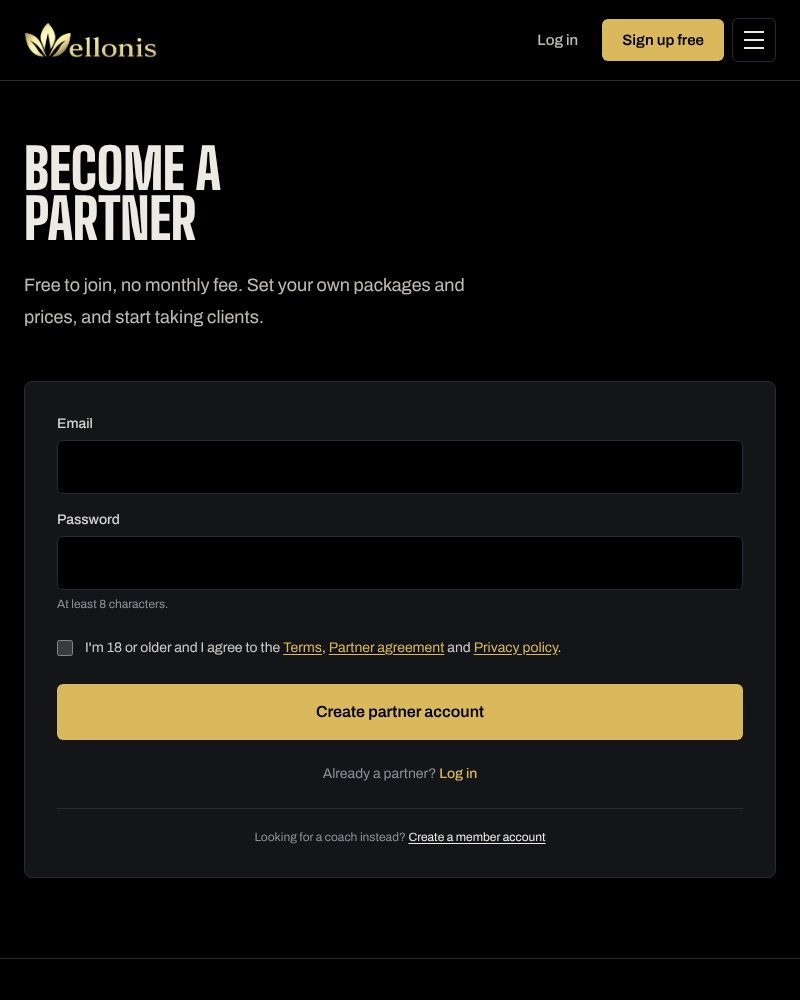
2. Your coach dashboard
After you log in you land on Overview. The menu runs along the top on phones and down the side on computers. Numbers on a menu item (for example Requests 1) mean something is waiting for you.
- Overview: your link and QR code, new requests, calls to accept, active clients and what you've earned.
- Requests: new package requests and call bookings to accept or decline.
- Clients: everyone who bought from you, with their plan and chat.
- Messages: client chats, your notifications and Wellonis support.
- Coaching profile, Packages, Video calls, Documents: what members see and buy.
- Get paid, Earnings: payout method, money waiting and payment history.
- Reviews, Challenges, My Reps, My videos, Community, Settings.
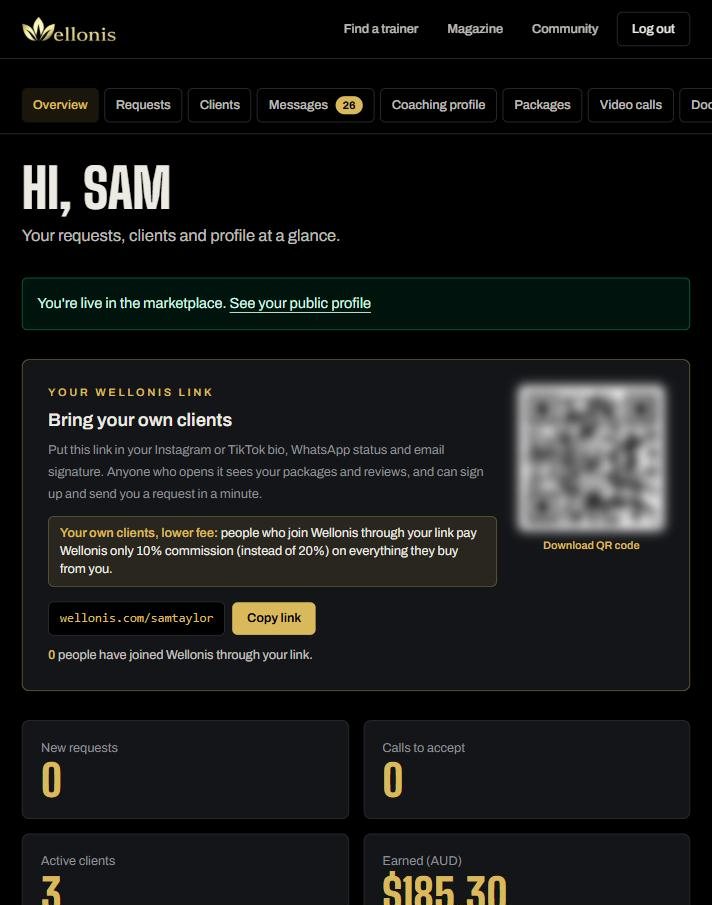
3. Build a profile members choose
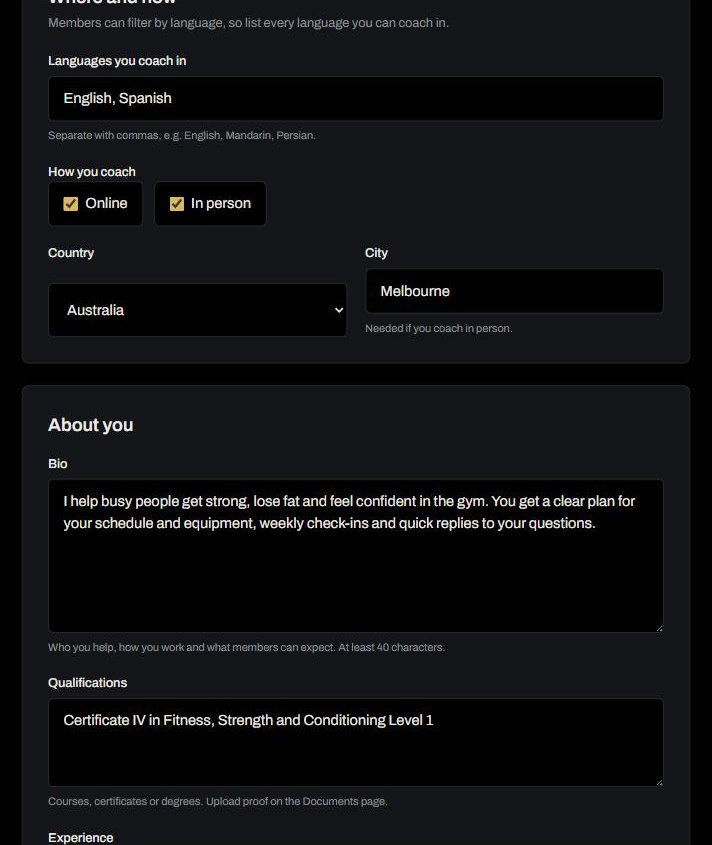
Your Coaching profile is your shop window. Members filter by coach type, language, price, online or in person and gender, so complete every field.
- 1Coach type and years of experience.
- 2Show your gender (optional). Some members prefer a female or male coach; leave it on Don't show if you prefer.
- 3Headline: one line members see first, for example "Strength coach for footballers and rugby players".
- 4Sports and specialities, separated by commas: football, hypertrophy, fat loss, postnatal fitness.
- 5Languages you coach in. List every language: members search by it.
- 6How you coach: Online, In person or both, plus country and city (needed for in person).
- 7Bio (at least 40 characters): who you help, how you work and what members can expect.
- 8Qualifications and Experience: courses, certificates, teams, gyms and the kinds of clients you've coached.
- 9Tick I agree to the partner agreement and tap Save profile.
Tip: Changes to your coach type, headline, bio, specialities or experience get a quick review before they show. Other settings save straight away. Your photo and name come from Settings.
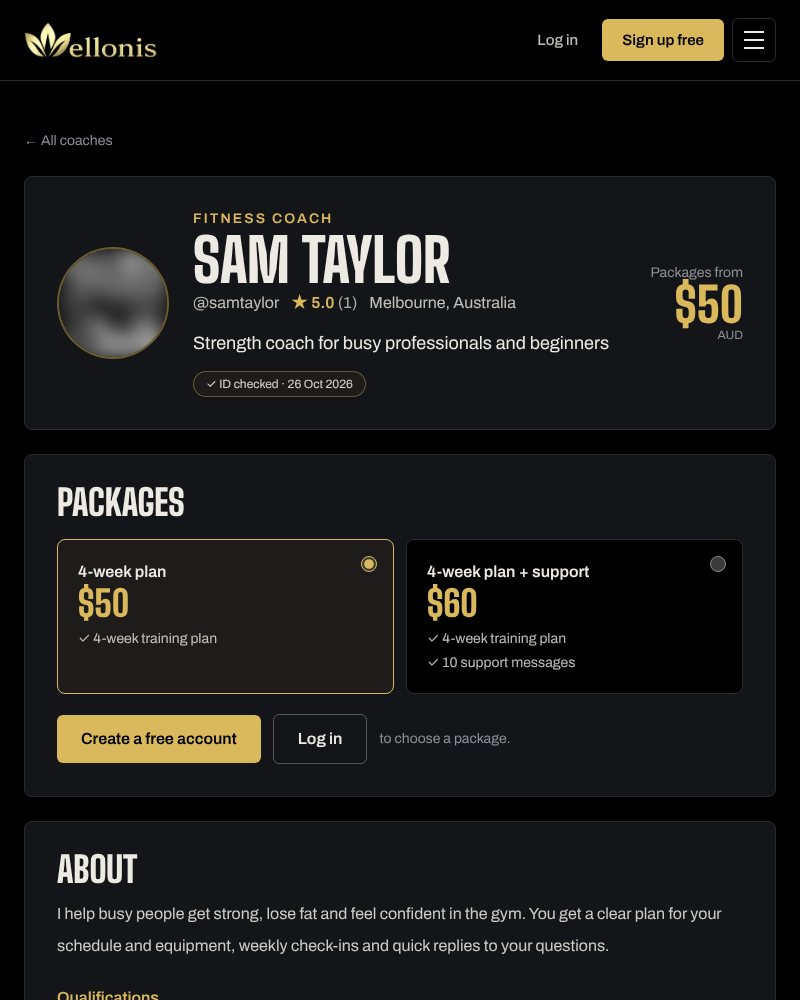
4. What members see
This is your public page (wellonis.com/@yourname). It shows your photo, coach type, headline, rating, city, the badges our team checked, your packages and prices, your bio, qualifications, experience, reviews, languages and how you coach. Tap View public profile on the Coaching profile page to check it any time.
Tip: Profiles with a clear friendly photo, a specific headline and at least two packages get far more requests.
5. Packages and prices
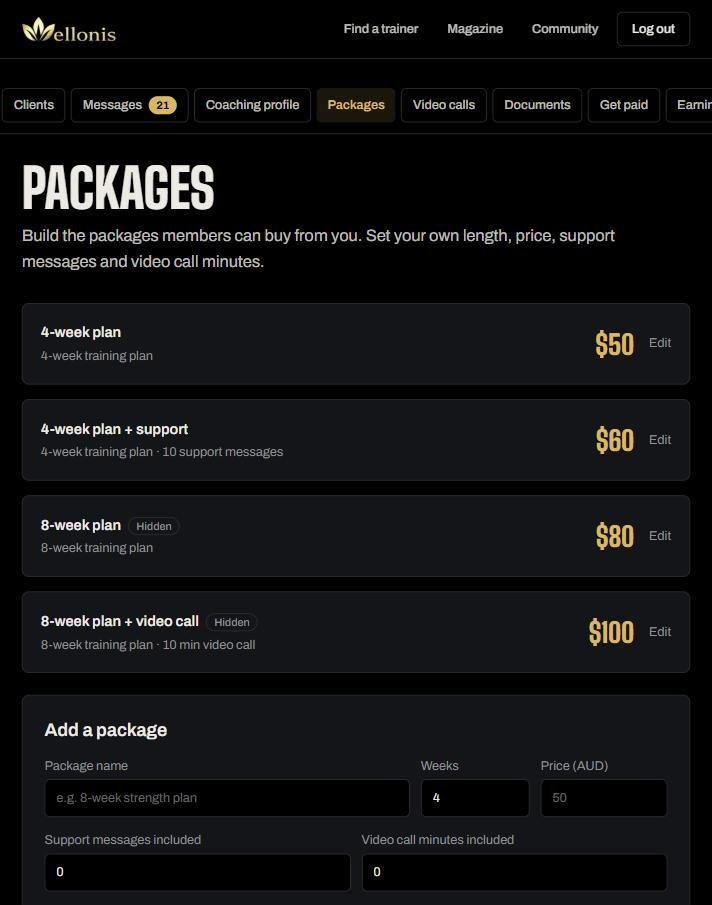
Packages are what members buy from you. You choose the name, length, price and what's included.
- 1Open Packages → Add a package.
- 2Package name (e.g. "8-week strength plan"), number of weeks and price in Australian dollars.
- 3Support messages included: how many messages your client can send you. Your replies are always free.
- 4Video call minutes included, booked from your weekly availability.
- 5What's included (optional) and Show this package on my profile.
- 6Extra messages: set a price for 10 more messages. When a client runs out they can buy more from you. Leave it empty to turn it off.
Tip: A simple ladder works well: a plan only, a plan with support messages, and a longer plan with a video call. Prices are in Australian dollars for now; members abroad pay in AUD and their bank converts it.
6. Documents and badges
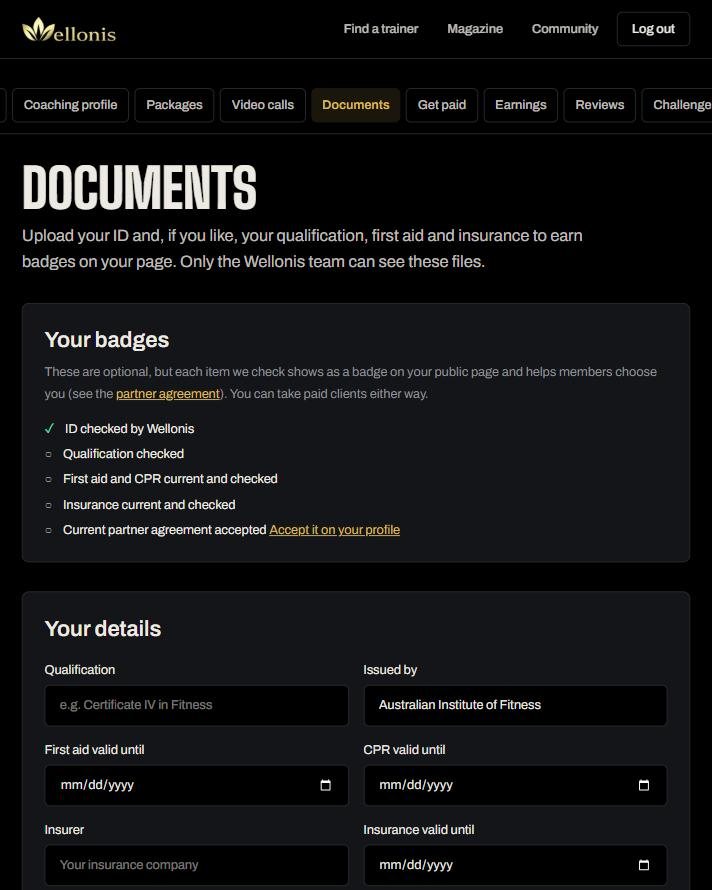
Upload your documents so our team can check them. Only the Wellonis team can see these files. Each item we check shows as a badge on your public page and helps members choose you.
- ID (passport, national ID card or driver licence) is required.
- Certificates and qualifications: coaching certificates, courses or a sport science degree.
- First aid and CPR certificates, with expiry dates.
- Insurance: certificate of currency for professional indemnity and public liability. It should cover online coaching and video calls.
- Experience (optional): a CV, reference letter or proof of the teams and clients you've coached.
- Files: PDF, PNG, JPG, WEBP or DOCX, up to 20 MB each. Our team checks them within 2 business days.
Tip: When your first aid or insurance renews, upload the new certificate and update the date so your badge stays current.
7. Choose how you get paid
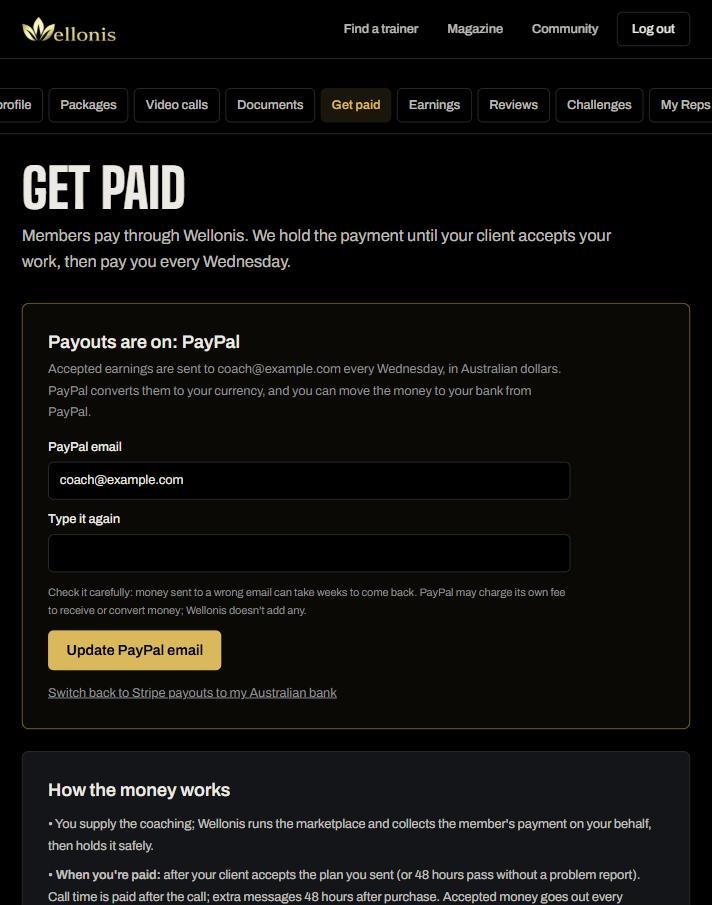
Open Get paid and set up how you're paid.
- Stripe: paid straight to your Australian bank account. Set up takes about 5 minutes on Stripe's secure page (ID, ABN if you have one, bank details). Wellonis never sees your bank details.
- Outside Australia: you're paid by international bank transfer to your own bank, in your currency. Our team emails you to collect your bank details securely before your first payout. Stripe bank payouts in Australia cost 0.5% + A$0.25 per payout, plus A$2 in any month you're paid, taken from the payout.
- Details for your statements: legal or business name, ABN (if you have one) and GST registration. You're responsible for your own tax and GST.
- Payouts go out every Wednesday for money your clients have accepted.
8. Video calls (optional)
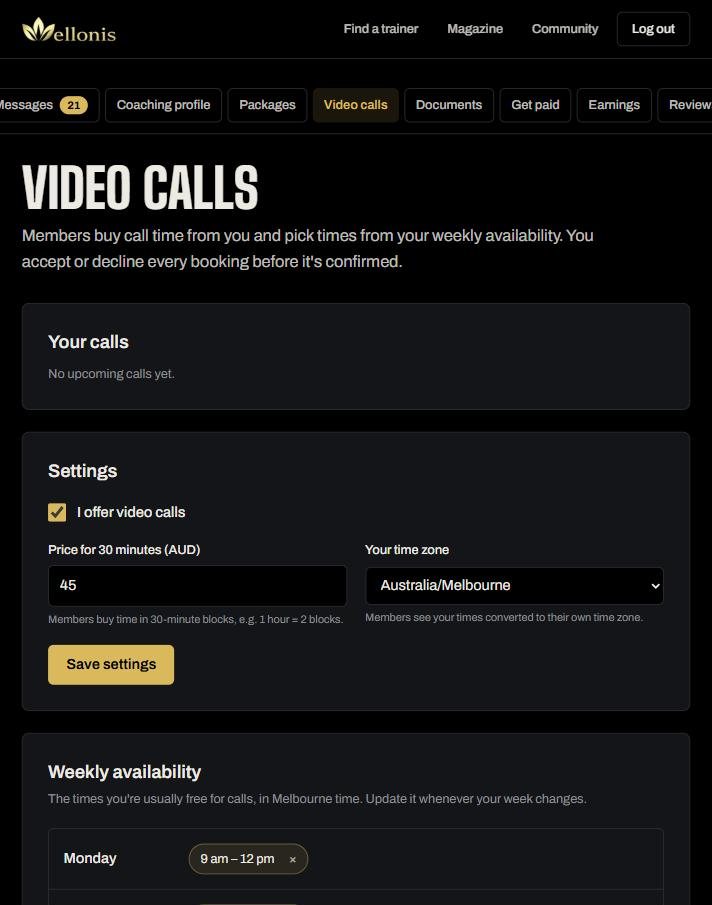
Members buy call time from you in 30-minute blocks and pick a time from your weekly availability. You accept or decline every booking before it's confirmed. Calls run inside Wellonis in a private room and aren't recorded.
- 1Tick I offer video calls and set your price for 30 minutes.
- 2Choose your time zone. Members see your times converted to their own time zone.
- 3Add your weekly availability: choose days, a from and to time, then Add to selected days.
- 4When someone books, accept it in Requests. At the time of the call, open it from Video calls or the link in your notification.
Tip: Call time is paid after the call. Our commission on calls is never less than A$0.50 per 30 minutes because we pay for hosting them.
9. Accept requests
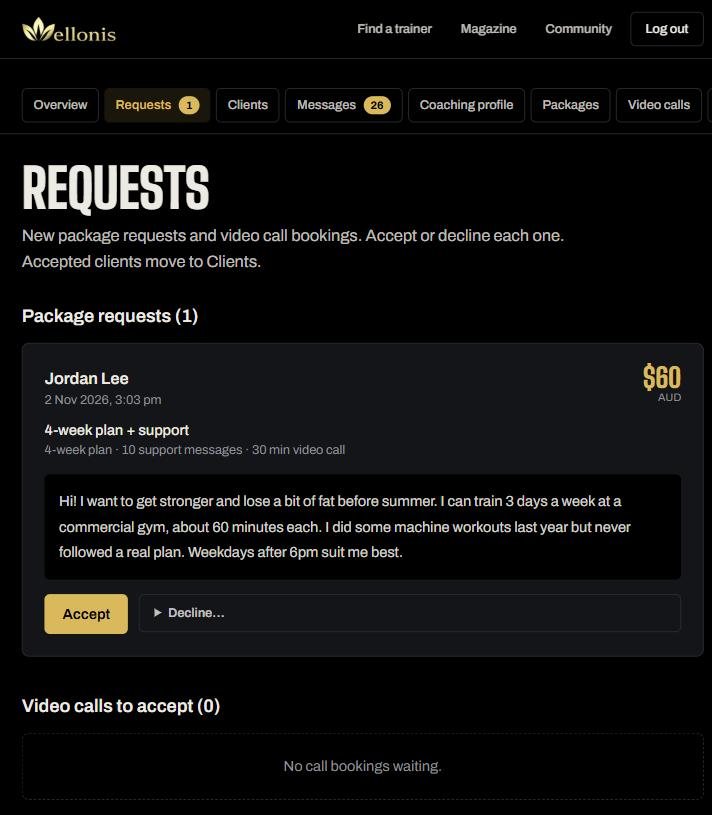
When a member chooses one of your packages, you get a notification and the request appears in Requests with their goal, the package and the price.
- 1Read the member's message: goal, experience, schedule and anything to be careful about.
- 2Tap Accept if you can help, or Decline… with a short reason if it's not a fit.
- 3Accepted members are asked to pay. When they've paid, you get "Client paid: send their plan".
- 4Reply quickly: replying within 24 hours earns you Reps and members choose coaches who answer fast.
Tip: If a member mentions an injury, illness or medical condition, don't diagnose or treat it. Coach around it sensibly and suggest they see a health professional.
10. Clients
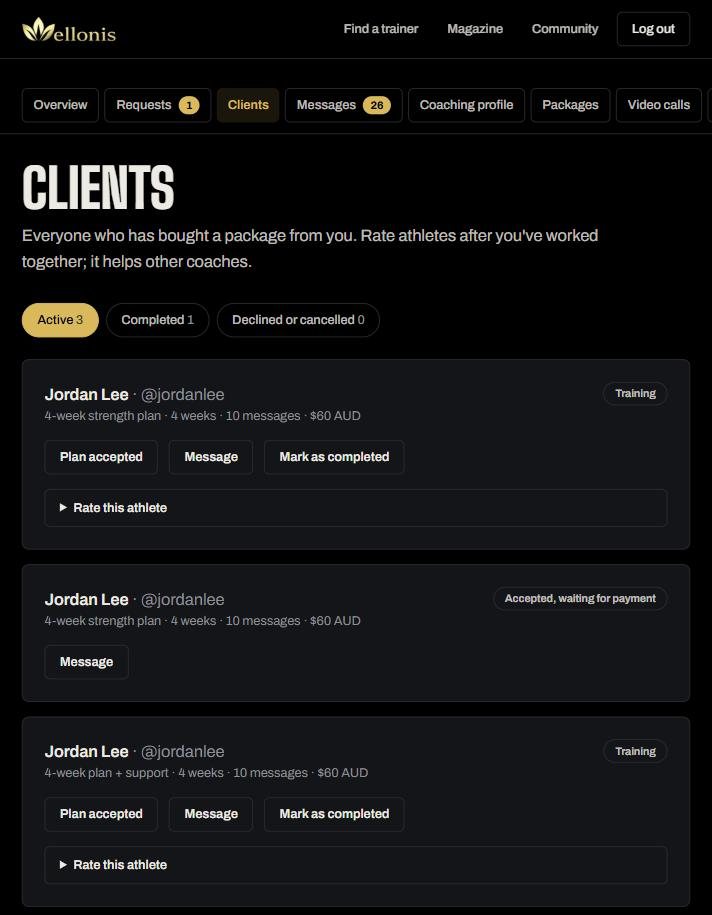
Clients lists everyone who has bought from you, sorted into Active, Completed and Declined or cancelled. Each card shows the package, weeks, messages and price, with buttons to open the plan, message the client, mark the work as completed and rate the athlete.
11. Write and send the plan
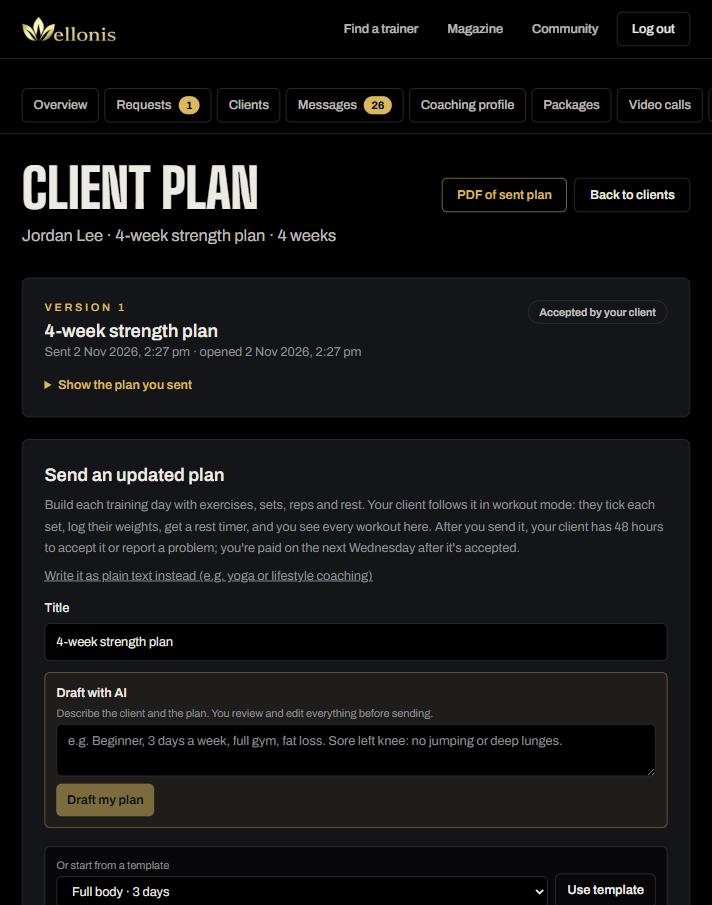
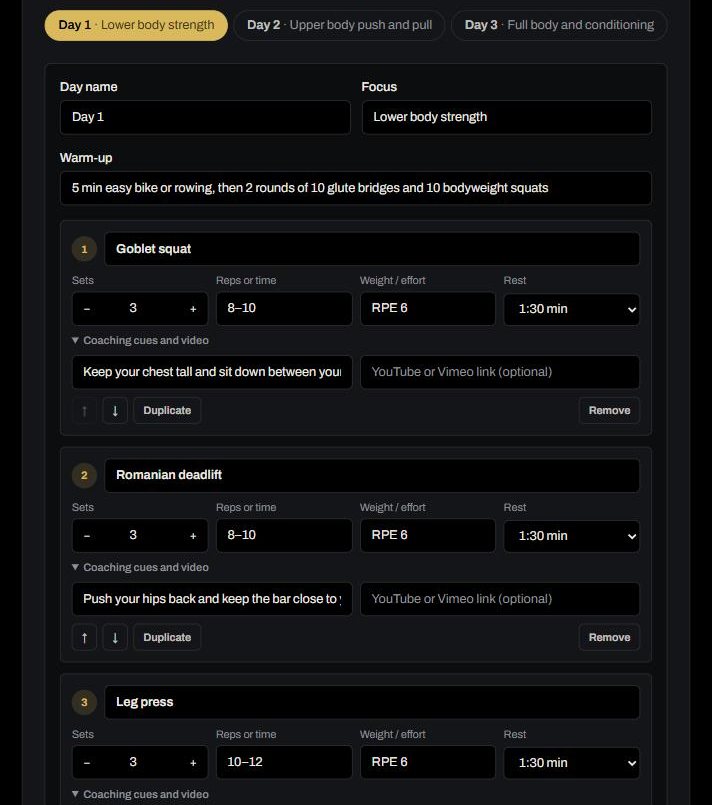
Open a paid client's plan from Clients. Build their training days with exercises, sets, reps, weight and rest. Your client follows it in workout mode: they tick each set, log their weights, get a rest timer and can even count reps with the phone camera. You see every workout they finish.
- 1Give the plan a title.
- 2Fastest start: Draft with AI. Describe the client and the plan in a sentence or two (e.g. "Beginner, 3 days a week, full gym, fat loss. Sore left knee: no jumping"). The AI fills in the builder and you review and edit everything before sending. Up to 10 drafts a day.
- 3Or start from a template: Full body 3 days, Upper/lower 4 days, Push/pull/legs 3 days or Running 3 days.
- 4Set the number of weeks and write a short overview for your client.
- 5For each day: name, focus, warm-up, exercises and cool-down. Use + Day to add days, and Move, Duplicate or Delete to arrange them.
- 6For each exercise: sets, reps or time, weight or effort (e.g. 20 kg, RPE 7, bodyweight), rest, plus coaching cues and an optional YouTube or Vimeo link.
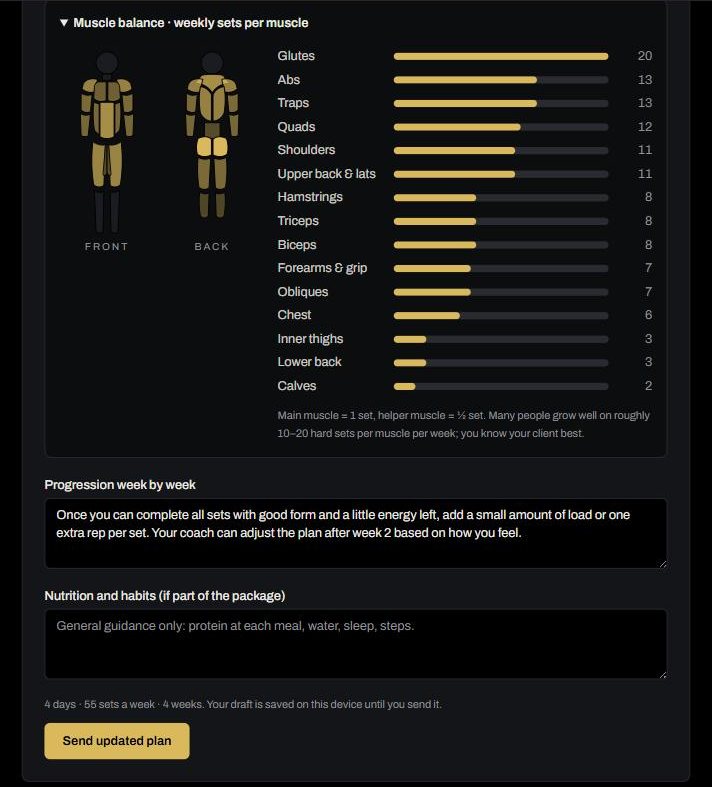
- 7Check the Muscle balance: weekly sets per muscle, so nothing is forgotten.
- 8Add how to progress week by week and, if it's part of the package, general nutrition and habit guidance.
- 9Tap Send plan. Your draft is saved on your device until you send it.
Tip: Coaching yoga, lifestyle or something that doesn't fit sets and reps? Choose "Write it as plain text instead".
12. After you send: acceptance, progress and check-ins
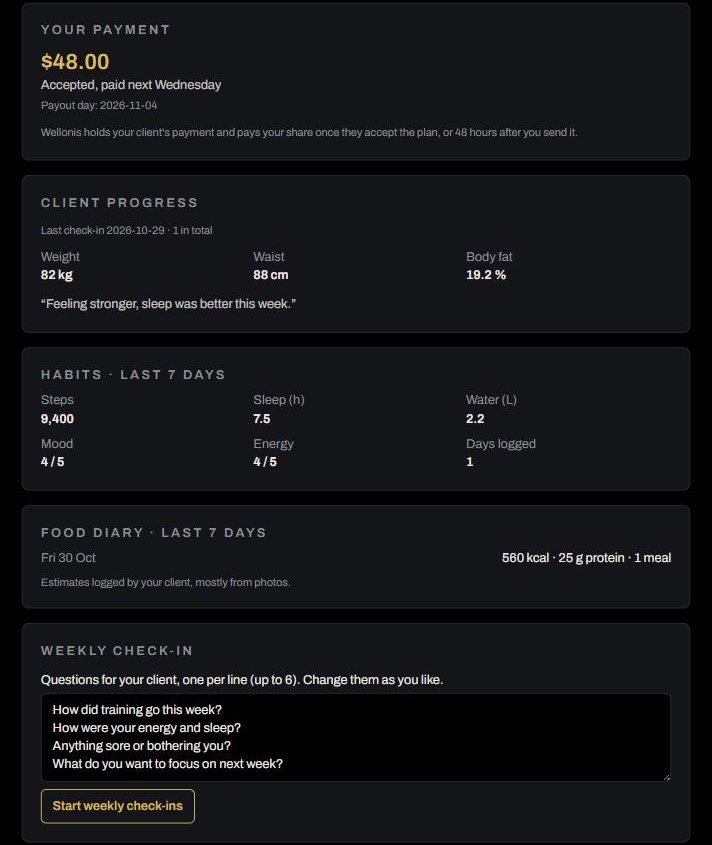
After you send the plan, your client has 48 hours to accept it or report a problem. If they don't answer, it counts as accepted. Once accepted, your share is paid on the next Wednesday. Need to change something? Send an updated plan; it becomes a new version.
- Your payment: how much you earn from this client and when it's paid.
- Client progress: their latest body check-in (weight, waist, body fat) and notes.
- Habits and food diary: steps, sleep, water, mood, energy and meals from the last 7 days. Clients share these with you only while their plan is active.
- Weekly check-in: set up to 6 questions. Your client answers once a week and you reply with feedback.
- PDF of sent plan: a printable version with your name and a QR code to your profile. Clients can print it and take it to the gym.
Tip: Answering weekly check-ins is the easiest way to keep clients happy and renewing.
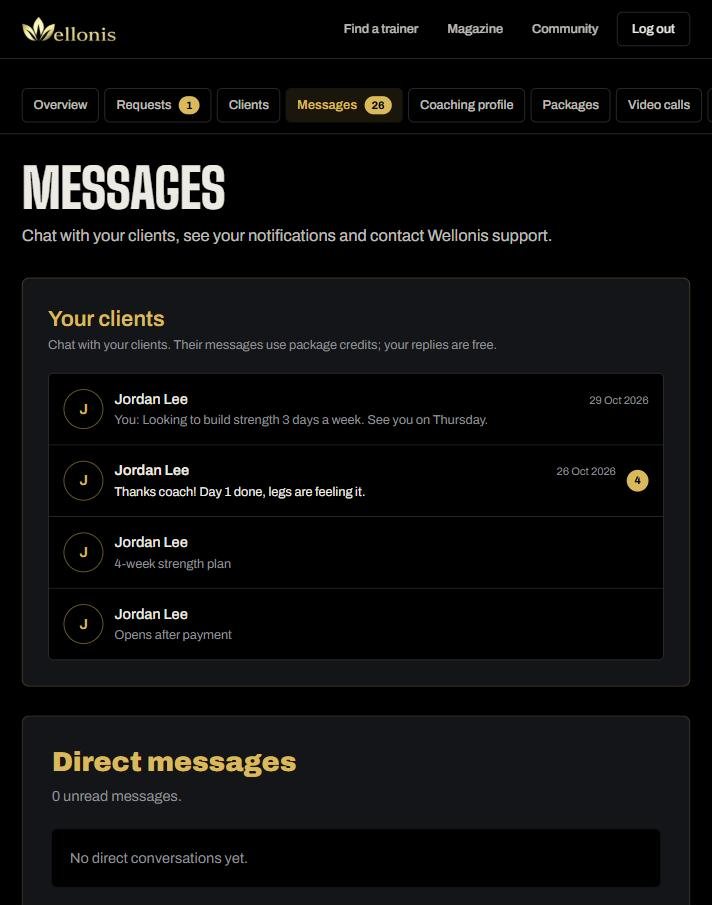
13. Messages and notifications
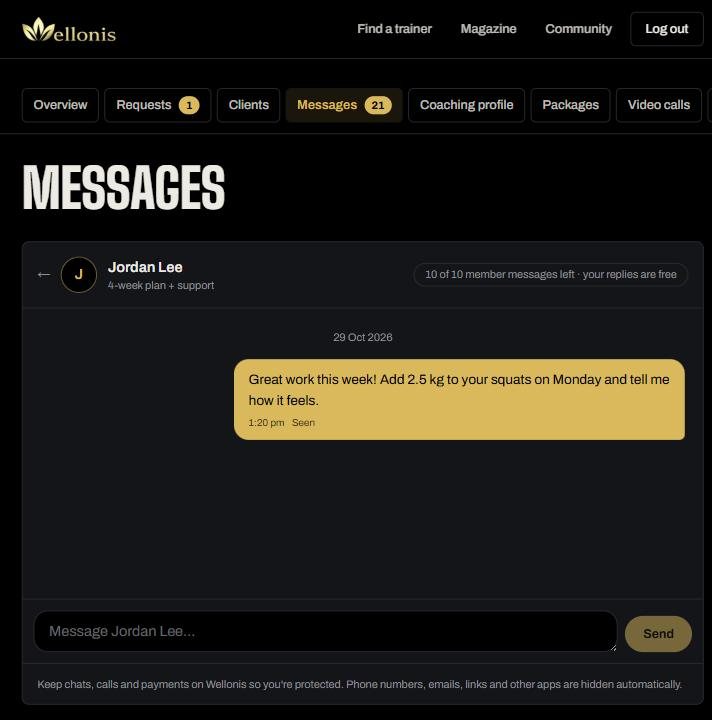
Messages has your client chats, direct messages, your notifications and Wellonis support. Client messages use their package's message credits; your replies are always free.
- Phone numbers, emails, links and other apps are hidden automatically. Keep chats, calls and payments on Wellonis so you're both protected.
- Turn on phone notifications (Settings or the prompt on your dashboard) so new requests and messages reach you straight away.
- Need help? Tap Ask Wellonis (bottom right) for quick answers, or Report a problem to tell our team about a bug. The page you were on is sent automatically.
14. Earnings and payouts
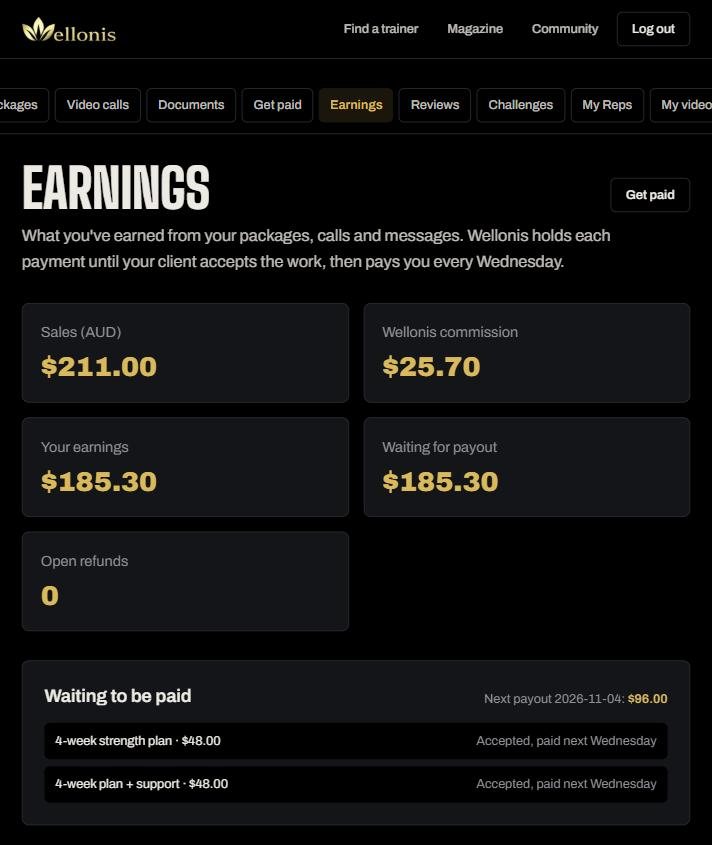
Earnings shows your sales, Wellonis commission, your earnings, what's waiting for payout and any open refunds. Below that: what will be paid next Wednesday, your full payment history and weekly statements for your records.
- Packages are paid after your client accepts the plan (or 48 hours pass without a problem report).
- Call time is paid after the call; extra messages 48 hours after purchase.
- If a client reports a problem, their payment stays on hold while Wellonis reviews both sides. We may pay you, ask for an improved plan, or refund the client in full or in part.
15. Grow: your link, reviews, Reps, videos and community
Wellonis has free tools to help you get noticed and keep clients engaged.
- Your link and QR code (Overview): put wellonis.com/@yourname in your Instagram or TikTok bio, WhatsApp status and email signature. Members who join through it pay you a lower 10% fee on everything they buy from you, and you earn 200 Reps per new client.
- Reviews: members rate you after working together, and great reviews move you up in search. You can rate athletes too, which helps other coaches.
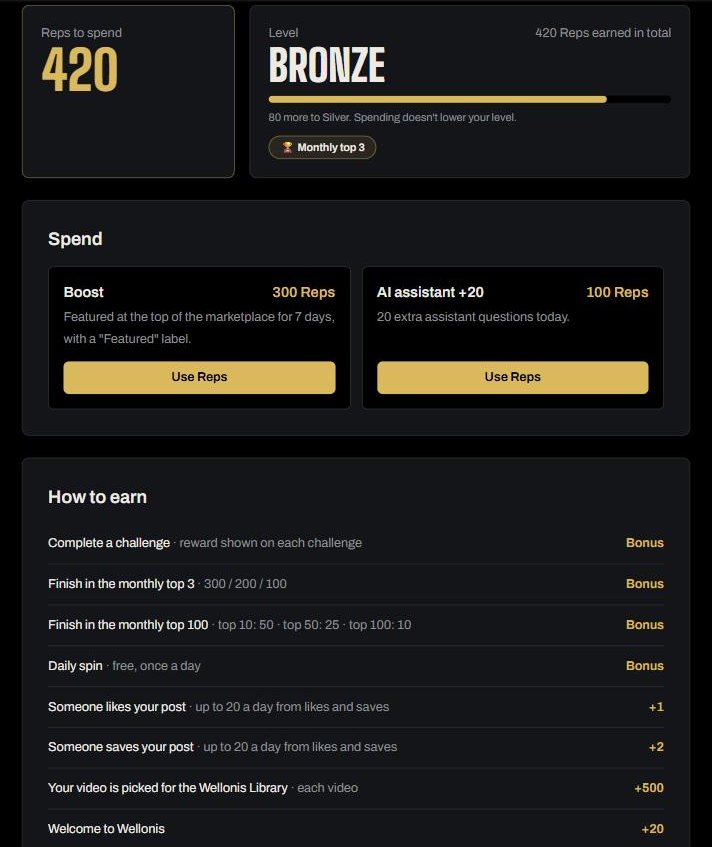
- Reps: points you earn by coaching and helping the community. Spend 300 Reps to be Featured at the top of the marketplace for 7 days (always labelled), or 100 Reps for extra AI assistant questions. Reps have no cash value.
- Challenges and leaderboard: monthly challenges (e.g. reply to 5 requests within 24 hours) and a free daily spin. Top coaches each month win bonus Reps.
- My videos: share a YouTube or Vimeo technique tip. If our team picks it for the Wellonis Library, you earn 500 Reps and get credited.
- Community: post your training, tips and client wins (with permission). Choose Public, Followers only or Private for each post.
16. Settings, app and security
Settings is where you change your photo, name, email, date of birth and phone (only our staff see your phone number), who can see your community profile and message you, your password, and where you can delete your account.
- Android: install the Wellonis app for notifications and quick access.
- iPhone: open wellonis.com in Safari → Share → Add to Home Screen. It opens full-screen and can send notifications.
- Use a strong password you don't use anywhere else, and log out on shared devices.
The rules that keep everyone safe
These come from our Terms and Partner agreement. Breaking them can lead to your profile being paused or removed.
- Coach fitness and wellbeing only. Don't diagnose, treat or rehabilitate injuries or medical conditions, and don't call yourself a registered health professional unless you are one. Refer people to a doctor or health professional when needed.
- No guaranteed results ("lose 10 kg in 4 weeks, guaranteed") and no treatment or cure claims.
- Keep chat, calls and payments on Wellonis. Don't ask clients to pay you outside Wellonis or share contact details to move off the platform.
- Members are adults (18+). Be professional and respectful at all times.
- Only show qualifications and badges you really have; we only display what our team checked.
- Protect your clients' privacy: their health details and diaries are for coaching them, never for sharing.
- Use Report and Block for harassment, scams or unsafe behaviour. Our team reviews every report.
Frequently asked questions
- How long does approval take? Usually within 2 business days after your profile and ID are complete.
- When do I get paid? Every Wednesday, for work your clients have accepted.
- What does Wellonis take? 20% when a client pays (10% for clients from your own link). Members cover payment costs through a service fee (4% + 30c) on top of your price. The cost of sending your payout comes off it: Stripe 0.5% + A$0.25 per payout plus A$2 in any month you're paid, or the transfer cost for international bank payouts. Very small weeks roll into the next payout. Founding coaches pay 10% for a set period.
- How do members pay? By card, Google Pay, Apple Pay, Klarna or Zip through Stripe.
- Can I coach clients in other countries? Yes. Paid coaching is open worldwide except countries under broad sanctions.
- What if a client is unhappy? They can report a problem within 48 hours of your plan. Our team reviews both sides fairly. Clear plans and quick replies prevent almost every problem.
- Can I change my prices? Yes, any time in Packages. Clients who already paid keep the price they paid. Every package must be at least A$30, whatever its length, so prices stay fair for all coaches.
- Who do I contact? Tap Ask Wellonis in your account, use Messages → Wellonis support, or email hello@wellonis.com.
Ready to coach?
Joining is free. Set up your profile today and start taking clients worldwide.